
Workplace Connect
Workplace Connect
We’re switching on your new pension scheme administration portal
The pensions landscape is constantly changing and it’s vital that we continuously invest in and improve our technology to meet your needs now, and in the future.
To help us deliver on our ambitions, we've partnered with global IT provider Tata Consultancy Services (TCS) to evolve our technology ecosystem and have built Workplace Connect - our new award-winning scheme administration portal.
Using the latest technology and feedback from users like you, Workplace Connect is simple and secure. It introduces features and functionality that will make it easier for you to manage your scheme and stay on top of regular administration tasks.
Get ready for your switch on date
As we prepare for your switch on date in mid-November, please save this page to your favourites. You can then come back and get the latest information on the timeline, support to help you prepare, and useful tips for using Workplace Connect.
To help ensure a smooth transition, there are a few things you can do in preparation for the switch.
- Make sure your files are in the correct format (.csv)
- Check your file headers against the accepted headers in this guide so that Workplace Connect can understand what is in your file
- Make sure you’re ready to provide correct and up-to-date pay period earnings for each member, as Workplace Connect has increased validation in the pay journey to help you meet your duties
- Ensure that your pay file includes members' full names rather than preferred names or initials, as Workplace Connect will use these to check against our records
- Ensure you’re using an up-to-date browser, Internet Explorer is no longer supported
We’ve drawn out some additional key checks you can do now to get your files ready and FAQs below.
But first watch our Workplace Connect overview video to help familiarise yourself with how to navigate the new portal.
Welcome to Workplace Connect. In this video, we’ll give you a quick tour of the portal, helping you find your way around and access the tasks and information you need.
On the main dashboard, you’ll see your personalised timeline. This is tailored to your payroll cycle and helps you stay on track with key tasks, such as joining new members to the scheme and making payments. Each task includes support materials and help videos to guide you through the process. Before starting a payment for a pay period, make sure you’ve joined any new members to the scheme.
If you use Standard Life to assess your workforce, you’ll also see an assessment task in your timeline. This must be completed before you can join employees to the scheme or make payments.
When making payments, these must be paid to us by the 22nd of the month following your payroll date. You’ll need to allow three working days for the Direct Debit to be collected after you submit your file. You can also future-date the Direct Debit collection, giving you the flexibility to choose a date that works best for you.
The notifications section displays recent transactions that have been completed. You’ll also find quick links to key information, including details of employees who have recently left the company or opted out of the scheme.
From here, you can also access reports showing any contributions that have been refunded following an opt-out. At the top of the screen, you’ll see a range of menu options. We’ll now take a look at each section, and give you an overview of the information available within them.
The Employees section shows all employees currently in the scheme under the Manage Members tab. To help keep things manageable, the page displays up to 500 employees at a time.
If you’re looking for a specific employee, you can use the search and filter options to quickly narrow down the list. You can also download the full member list in Excel format by selecting the download icon.
To view or update an employee’s details, select the three dots next to their name. From here, you’ll be able to access and edit their member information by clicking ‘member details’. The member details page allows you to easily view and update member details. Click ‘edit’ in the section that requires changes, and a pop-up will appear. Make your changes directly in the pop up, then click ‘save changes’. You’ll then get confirmation that the details have been changed. Click OK, then ‘back to manage members’ to return to the Manage members tab.
The Employees section has further tabs to let you view members who have left, or who have opted out. You can use the filters to ease your search.
In the task history tab, you can find details of employees who’ve been joined to the scheme and any assessment files submitted. Click into each task for further details, and then click ‘back to member history’ to return to the main task history tab.
In the payments section, under the Manage payments tab, you can check your payroll details are correct.
You can also ensure that your bank details are accurate by clicking the ‘Payment accounts’ tab, however you will need to contact us with a secure message to make any changes to these.
You can view a history of the payments you’ve submitted on the portal by clicking the payment history tab. If you click on any payment, you’ll be taken to the payroll summary page, where you’ll have the option to download the payment submission in csv or pdf format.
The Scheme info section tells you key information about your pension scheme. It’s worth checking this matches your expectations. If anything is incorrect, you can contact us by calling or sending a secure message to make any changes.
In the Governance section on the Reports tab, you can download your opt out refund report. Use the date filter before pressing the download button. This report will help you reconcile any monies we’ve returned to you.
There are other tabs providing links to useful pension information to help you manage your scheme effectively.
If you need assistance, our Help Centre section is a great place to start for support on a range of key tasks, such as Joining members, Making a payment, and Managing your employees.
Once you click into a key task, you can access data guides and frequently asked questions for advice on a range of processes. If you can’t find the information you need here, you’ll also be given the option to get in touch directly by secure message.
If you ever need support, you can contact us using our secure messaging feature, which is available throughout the portal. Just look for the envelope icon in the top menu.
From there, you can send new messages, reply to existing ones and add attachments if needed. We’ll also send you an email to let you know when we’ve replied.
We hope this has given you a good overview of how to navigate the portal and access key information. For more support, visit the Help Centre or send us a secure message.
What are the benefits of Workplace Connect?
We’ve built our new portal based on user insight. It gives users a personalised dashboard and timeline, improved validation and enhanced journeys.
-

Easy to use
Real-time validation, fully automated processing, and downloadable records ensure that members’ details are always accurate and up to date.
-

Secure
Multi-factor authentication, tailored access, and encryption keep your members' data safe and secure. Plus, you can view real-time audit trails for total visibility.
-

Flexible
Workplace Connect gives users the flexibility to tailor access, control payments, and adapts to different scheme requirements such as auto-enrolment assessments and single or multiple payrolls.
Discover more about Workplace Connect
Watch our video to discover more about the features of our new portal.
When it comes to managing your pension scheme, we understand you need a secure, flexible and efficient way to complete regular tasks. Our digital scheme administration portal utilises the latest technology and brings together everything you need in one place.
Built on employer insight, the portal gives you an easy-to-use site that helps you stay on top of regular scheme administration tasks. Multi-factor authentication, plus tailored restricted access and encryption to keep your data secure, and the flexibility to adapt to the unique features of your scheme.
So, let's take a closer look.
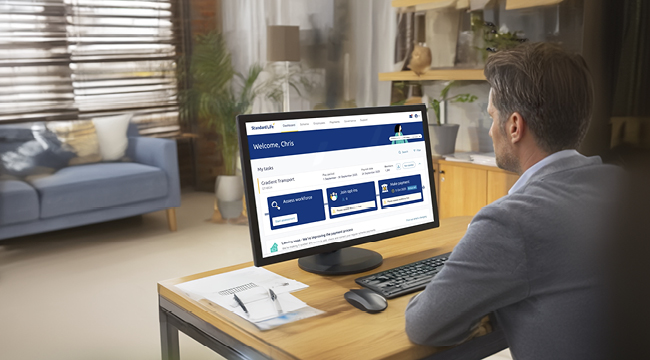
The personalised dashboard gives you easy oversight, showing your pay period, payroll date and number of members. Using the task timeline, you can quickly access regular actions like assess, join and pay.
Our message banner draws attention to important topics, such as the latest regulations or upcoming enhancements. And to make sure you always know what to do and when, the notification centre acts like a built-in personal assistant, alerting you to upcoming tasks such as payments due or outstanding actions for your scheme.
And if you want to dive deeper into our latest news and expert insights, you'll find links to all kinds of useful information right here in the dashboard.
When you need to join new members, the administration portal makes it fast and flexible. You can choose to add members in bulk by uploading a file or, if you prefer, one by one. It also automatically reads and imports member data.
In-journey validation means that, if there are any errors, gaps or duplicates, it simply prompts you to make changes there and then, saving you time, so you can set up new members without having to leave the portal.
Once your data has been validated, you'll get a confirmation summary and you can even download a submission record for your files.
The administration portal also takes the hassle out of making contribution payments. You can choose to update your existing payment file online or upload a new one.
Just like joining new members, the portal automatically reads and imports the payment file, no matter how the data is laid out, and will raise any queries so that they can be resolved in real time. Throughout the portal, there's information to guide you, plus handy tooltips and a help centre. If you need to contact us, send our expert team a secure message from within the portal.
You're in control of when the contributions will be paid and the summary page shows you how much will be collected and when, along with the option to download a copy of your submission.
We know how important it is to keep a record of joiners, leavers and contributions, plus an audit trail of who carried out which task. The administration portal enables you to view this information and download historical submissions whenever you need them.
Through insight gathered from employers like you, we've invested in the development of our administration portal. Which is flexible, secure and means that managing your pension scheme is easier than ever.
Essential reading, please ensure you read this section below to help you prepare for a smooth transition to Workplace Connect based on existing users feedback.
Preparing for a smooth transition
There are some things you can do now to help ensure a smooth transition including:
- Make sure your files are in the correct format (.csv)
- Check your file headers against the accepted headers in this guide so that Workplace Connect can understand what is in your file
- Make sure you’re ready to provide correct and up-to-date pay period earnings for each member, as Workplace Connect has increased validation in the pay journey to help you meet your duties
- Ensure that your pay file includes members' full names rather than preferred names or initials, as Workplace Connect will use these to check against our records
- Ensure you’re using an up-to-date browser, Internet Explorer is no longer supported
- Watch our Workplace Connect overview video to help familiarise yourself with how to navigate the new portal.
You’ll be able to access the new portal in the same way as before – the web address and login details remain the same, and you don’t need any new data points but you may need to:
- Confirm the scheme payroll date and start of pay period. This ensures the personalised dashboard is set up correctly
- Confirm the pensionable pay definition. This is required to validate contribution amounts. Visit our auto-enrolment contributions page for more information
When you use Workplace Connect for the first time, we recommend logging in earlier than normal. This will allow time to familiarise yourself with the new layout and resolve any data queries that the new validation may highlight.
Have a look at our user guide to see what to expect when you first log in or watch our video for an overview.
All new members must be joined before you submit a payment for them.
If you need to join new members, please do this first via the ‘Join Members’ tile. We’ll then include/recognise the new members in your payment file for the current pay period.
Have a look at our user guide to see the Join journey.
You can choose whether to update your payment online or upload a payment file in standard .csv format - we recommend using the update online option if there are only minimal changes from your last submission.
If you choose the upload option you can use your existing file or the template available in your current portal (i.e. Group Pension Zone or Workplace Hub). If you use your own file you need to include:
- Pay period pensionable earnings
- Regular employer payment in £
- Regular employee payment in £
You can also tell us about any one-off contributions, leavers or contribution holidays in the file – remember to include the date of leaving.
You may find that you need to update the column headers in your file so that Workplace Connect recognises the data. We've created this Assess, Join, and Pay - top tips and column header guide that you can download, and for more information check out the portal help centre.
Have a look at our user guide to see the Pay journey.
Workplace Connect is designed to help ensure your scheme data is up to date and compliant with regulatory requirements. We’ll automatically check:
- That payments are included for all active members
- That member personal details on your pay file match our records
- That percentages match the pay period earnings
We'll check that all contributions meet auto-enrolment minimums based on the pay definition provided and we'll highlight any which are below the minimum amount. You'll need to provide a reason for any underpayments as part of completing your payment.
For Group Pension Zone Users
- The new portal will need information in your payroll file to check that employees are getting the right contributions. You may already be providing this. For some Group Pension Zone users your file may not have everything that’s needed. To help you get your files ready, take a look at our guide.
To make it easier for you to identify employees, Workplace Connect gives you the option of using a ‘unique employee identifier’ such as a staff number. If you wish to use this, you need to let us know the unique identifiers first by accessing the ‘Employees’ tab in Workplace Connect and selecting the ‘Bulk Unique ID’ option.
Please allow one working day for the system to be updated, then the unique identifier will be included if you download a payment template, or you can include this in your payment file going forward.
Please note this is optional, if you download a template and the column is blank you don’t need to add this information to your pay file
Workplace Connect allows you to tell us about someone who has left at the same time as you make the last contribution for them. If you include the leaving date in your file the system will automatically process the leaver. We’ve also made it easier to see all members in your scheme on a contribution holiday and for you to process them as a leaver. We’ve introduced a new section called ‘Manage member status’ where you can view and download a list of all members currently on a contribution holiday. This enables you to check their status off-line at any time. If they’ve subsequently left, Workplace Connect gives you the flexibility to process them as a leaver next time you log in.
Payment history going back 12 months will be available in Workplace Connect. If you need to know about payments that were made more than 12 months ago, please contact us to request this information.
Our digital applications, including existing Workplace portals and the Standard Life mobile app, will be unavailable over the weekend of the portal switch on to help make sure the changes are safe, secure and smooth. We'll also use messages on the portals and app in advance to notify users of any downtime.
Workplace Connect FAQs
As part of our work to evolve our technology ecosystem, we’re replacing the existing scheme portals, where routine tasks such as assess, join, and pay are carried out, with a new digital portal that’s powered by TCS.
Designed based on user insights, our award-winning Workplace Connect utilises the latest technology to offer an intuitive and streamlined user experience.
It brings everything that you need to run your scheme together into one place, including a new dashboard that makes essential, routine tasks easier and faster to manage than ever before.
In a nutshell, our new portal includes:
- A personalised dashboard showing pay period, payroll date and number of members, plus a real-time summary of upcoming actions such as payments due.
- The ability to assess and communicate with your workforce and add eligible employees as members.
- The flexibility to add new members in bulk or one by one.
- Full control of payments, collection dates, and amounts.
- Data validation, with the ability to resolve any issues within the portal.
- Fully automated processing that ensures member records are always up to date.
- Ability to leave the portal at any time and resume the task where it left off.
- An audit trail of who carried out which task and when. Historical submissions can be viewed and downloaded whenever you need them.
- Step-by-step help guides, tooltips, and the ability to send secure messages to our customer operations team.
Our technology provider is ISO27001 certified. Plus, we use multi-factor authentication, tailored access, and encryption to keep scheme data safe and secure.
Yes, over 6,500 schemes are already successfully using Workplace Connect. On average over 300 payment files a day and more than 4,000 new joiners a month are being processed straight through via the new portal. We're phasing the switch over and eventually all Workplace clients will use Workplace Connect.
Our new portal has built-in user guides, tooltips, and a help centre to guide you through each step of the journey. Plus, you can access our secure messaging to get in touch with our team of experts.
There are some things you can do now to help ensure a smooth transition including:
- Make sure your files are in the correct format (.csv)
- Check your file headers against the accepted headers in this guide so that Workplace Connect can understand what is in your file
- Make sure you’re ready to provide correct and up-to-date pay period earnings for each member, as Workplace Connect has increased validation in the pay journey to help you meet your duties
- Ensure that your pay file includes members' full names rather than preferred names or initials, as Workplace Connect will use these to check against our records
- Ensure you’re using an up-to-date browser, Internet Explorer is no longer supported
We'll let you know when Workplace Connect has been switched on for you. Please allow some extra time the first time you use the new portal so that you can familiarise yourself with the new system. The improved validation may raise some additional queries when you process your first payment.
Yes, the regulatory timescales for contribution payments remain the same. Payment files must be submitted in time for payments to be received by the 22nd of the month following payroll deductions, e.g. contributions deducted from July payroll must be paid by 22nd August. When you first use the new portal, please try to complete your first assessment (if applicable) and payment earlier than normal. This will allow time to resolve any data queries that the new validation may highlight and time to familiarise yourself with the new layout.
Yes, existing scheme terms and conditions apply.
TCS partnership FAQs
Our purpose at Standard Life is to help people secure a life of possibilities. Combining data and insights with state-of-the-art technology, we’re focussed on continuing to deliver even better experiences across all our key touchpoints, while maintaining value for money.
Key to this success is having the right technology and administration solutions in place. To help us deliver on our ambitions and improve member outcomes, we’ve chosen to partner more closely with TCS.
Whilst our existing infrastructure is fit for purpose, it’s vital that we future proof. Using TCS technology and expertise, we’ll enhance our development efficiency across all of our propositions and services. We want to be at the forefront of the latest technology and the greatest innovation, so we can continue to provide solutions that meet the evolving needs and expectations of our members, clients, and advisers.
TCS is one of the world's largest IT, Consulting and Business Process Services companies. They employ over 584,000 people worldwide in 56 countries. They operate across multiple sectors including insurance, wealth management and banking. Their specialisms include digital transformation, business process services, and analytics.
We’ve already successfully moved all of our digital journeys onto new TCS technology; seamlessly transitioned over 1.8 million customers to the BaNCs system and over 7,000 active schemes. We also worked with TCS to deliver our award-winning Client Analytics platform, experience orientated Innovation Lab, and Adviser Dash platform – and we’ll continue to work with them on new and innovative solutions.
Our programme of work involves updating the existing technology that currently supports employers and scheme members. This removes the limitations of maintaining multiple legacy systems, making it easier to integrate with new and innovative products and partners. Enhancing our technology ecosystem enables us to be more responsive to the evolving needs of employers and scheme members. This work has been recognised by the Global Sourcing Association who awarded Standard Life and Diligenta the 2026 Customer Experience Programme of the Year.
Yes, all plan and scheme numbers will remain the same.
At Standard Life we’re committed to protecting the personal information of members and the systems that data is held on. In order to meet this obligation, we have robust Information Security and Data Protection policies in place. These policies set the appropriate safeguards and are embedded and tested through our assurance and due diligence model. Furthermore, external audit and specialist third-party consultants conduct regular, independent assurance and benchmarking exercises across our business to ascertain the effectiveness of our security control environment and our security strategy.
Our security controls also apply to our third-party suppliers and are aligned to industry standards and good practice. This provides a controlled environment that effectively manages risks to the confidentiality, integrity, and availability of information. We have a robust and thorough due diligence process prior to appointing any third-party providers, along with ongoing oversight and monitoring.
All member data is stored in the UK. We use some third parties that may process data outside the EEA and the material ones are listed on the sub processor website (https://www.standardlifeworkplace.co.uk/employer/third-party-providers.page). Where we appoint a sub processor that processes data outside the EEA, we ensure that processing is compliant with Data Protection Legislation and that all of the relevant standard contractual clauses are in place.